
Legal and Regulatory

How Document Compliance Requirements Are Changing Page Numbering Practices

By UpdfSep 30, 20268 min read
How Document Compliance Requirements Are Changing Page Numbering Practices

A mid-sized manufacturing company submitted a 120-page environmental compliance report to a state regulatory agency last quarter. The report was three days early, and the company’s staff had done additional research to ensure the report was accurate. The state agency rejected the report in less than two days.

The reason? The report lacked sequential page numbering.

This example is representative of situations that occur routinely in the regulated industries of finance, health, law, and government services. Page numbering of PDFs is a routine form of preparing documents for an audit or other review. As legal work becomes increasingly digital and documentation requirements become more structured, seemingly minor details such as pagination can become an important part of the submission process. The global Legal Services Market is estimated at USD 1.10 trillion in 2026 and, assuming a 4.56% CAGR, is projected to reach approximately USD 1.50 trillion by 2033.

Page numbering is a form of maintaining an audit trail and may be a means of ensuring compliance with the law. Preparation of PDF documents for regulatory reviews, audits, and/or legal processes routinely includes add page numbering to PDF, and personnel involved in the preparation of the documents should understand the rationale for including page numbering as well as how to accomplish the task to avoid compromising the integrity of the documents.

For organizations operating in the U.S. Legal Services Market, this is particularly relevant when documents move between attorneys, courts, regulators, auditors, clients, and corporate legal departments. Three developments are making controlled document preparation increasingly important: the continued shift toward digital legal records, greater emphasis on traceability and audit trails, and the need to meet increasingly specific formatting requirements across legal and regulatory workflows.

The Compliance Case for Page Numbers

Industry regulations regard pagination as part of the documentation process. The FDA regulation, Title 21, Code of Federal Regulations, Part 11, requires the retention of audit trails for electronic records to permit reconstruction of the records’ likelihoods and changes, as well as the rationale for deletions. Page numbers are examples of such trails. Auditors rely on page numbers to refer to particular content, e.g. “please refer to page 47.”

add page numbers to pdf correctly

In the case of legal documents, regulations stipulate the use of electronic page numbers (e-numbers). The U.S. Courts require that, in PDFs, the electronic page numbers (e-numbers) correspond to the printed page numbers. In the appendices, the regulations require the use of Bates numbers (consecutive numbers assigned to pages). If a filing does not comply with these rules, it is rejected.

The same is true for filings undergo financial audits. As stated in a response to audit request, “[B]ased on our references to ‘page x’ or ‘paragraph y,’ etc., we can only confirm the information requested if the pages and/or paragraphs are present in your working copy of the document and have not been modified.” When multiple documents are combined into a single PDF, pagination aids auditors and shows control of the process.

The scale of these legal workflows can also be seen in market segmentation. By application, Corporate, Financial & Commercial Law accounted for approximately 33% of the legal services market in 2026, reflecting the significant volume of legal work associated with businesses, transactions, financial matters, and commercial relationships. The broader application landscape includes Corporate/Financial/Commercial Law, Personal Injury, and More, where properly structured documentation can make complex records easier to navigate and verify.

Why Adding Page Numbers Is Harder Than It Sounds

The operational reality is that most business documents aren't created as a single, clean PDF. They're assembled from multiple sources: a Word document for the narrative, an Excel export for the data tables, a scanned signature page, and perhaps a PowerPoint appendix. Each source may have its own numbering scheme, or none at all.

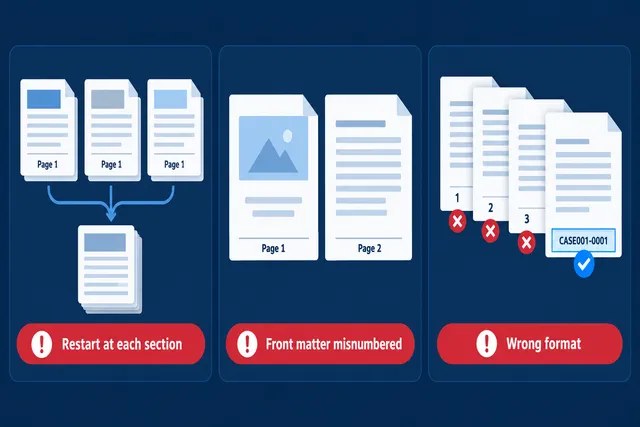
When these components are merged into a final PDF, three problems typically emerge.

First, numbering restarts at each section. A document with five merged components ends up with five "Page 1" entries. For an auditor attempting to trace a reference through the document, this is a navigational dead end.

Second, cover pages and front matter get numbered. In professional and regulatory submissions, the cover page, table of contents, and executive summary are usually excluded from the main numbering sequence. Without the ability to skip specific pages, the entire numbering scheme is off by the front matter count.

Third, the format doesn't match the standard. Some regulatory submissions require "Page X of Y" format. Others require Roman numerals for preliminary pages and Arabic numerals for the body. Still others, particularly in legal contexts, require Bates numbering with a case prefix. A generic "add page numbers" tool that only supports "1, 2, 3" won't satisfy these requirements.
What’s Inside the
Sample Report?

9 sections, free — no obligation.

Request Free Sample
  • Current Industry Events of 2026
  • Market Size Estimation
  • Regional Breakdown
  • Competitive Landscape
  • Customer Intelligence
  • Segmental Analysis
  • Pricing Analysis
  • Key Market Drivers, Challenges & Future Trends
  • Customized Insights Section

add page numbers to pdf issues

What Auditors and Regulators Actually Expect

Expectations for pagination in formal submissions have been developed and are widely followed.

Pagination requires that page numbers be consecutive and begin on the first page of the body of the submission and continue on all pages of the submission, including all appendices.

Pagination allows a submission to be cited and reviewed by others. If a submission is reviewed and a comment is provided stating, "Please see page 62 of your submission for more information," then page 62 is the page that should be reviewed.

Most coverage documents identify the front of the submission with a cover page, table of contents and/or other appendices as "front matter." Front matter is often numbered using roman numerals. "Body matter" is often numbered using Arabic numerals.

For submissions pertaining to legal matters, Bates numbering is usually required. In the legal matter, identification of a page as being "Page XX of XX" is often required. Protective orders and discovery agreements often specify Bates numbering.

The importance of these processes extends across different legal services. Representation & Advocacy captured approximately 42% of legal services market revenue in 2026, while the broader service landscape includes Representation, Advisory and Consulting and More. Whether documents support litigation, advisory work, regulatory matters, or business transactions, consistent pagination provides a practical way to identify specific information throughout a large file.

A Practical Workflow for Compliant Pagination

There’s no need to create a compliance department to satisfy the requirements listed above. The key is to implement a document workflow to account for pagination at the end of the process.

Pages should be added to the final draft of a document. Page numbers are meaningless, and can be incorrect, if content on a page is changed or removed.

The requirements for pagination of a document can vary based on the nature of the document or the reason it is being submitted. For instance, the pagination for a legal document may require the use of Bates numbering. For other types of document submissions, it may be sufficient to request “Page X of Y” numbering and allow for front matter to be paginated with roman numerals.

The numbering should be applied to the combined or consolidated PDF and not to the individual component documents.

The use of a PDF editor can be of great benefit to organizations to ensure that requirements related to the submissions of regulatory documents and legal and audit opinions are satisfied. Such a PDF editor would be beneficial if it supported numbering of pages after combining or consolidating documents and allowed for numbering to be selective based on the pages to be combined or consolidated. For example, the numbering could be selective based on covering or supporting documents. The PDF editor should also operate on a local machine to protect the security and confidentiality of the information. For a detailed walkthrough of the pagination workflow including Bates-style numbering and multi-format submissions this guide on add page numbers to PDF covers the full process.

For organizations involved in the U.S. Legal Services Market, these capabilities can be particularly useful when legal teams handle large collections of pleadings, contracts, discovery materials, regulatory records, financial documents, and supporting exhibits through legal case management software.

The legal sector is also supported by a broad ecosystem of established firms, including Kirkland & Ellis LLP, Latham & Watkins LLP, Baker McKenzie, Skadden, Arps, Slate, Meagher & Flom LLP, Clifford Chance LLP, DLA Piper, Allen Overy Shearman Sterling LLP, White & Case LLP, Sidley Austin LLP, Norton Rose Fulbright, Hogan Lovells, Linklaters LLP, Freshfields Bruckhaus Deringer, Jones Day, Morgan, Lewis & Bockius, CMS Legal Services, King & Wood Mallesons, Dentons, Herbert Smith Freehills, and Eversheds Sutherland. The specific services offered by these firms vary, but large-scale legal practices commonly involve extensive documentation that must be prepared, reviewed, and maintained accurately.

The Operational Takeaway

Page numbers are not a design detail. In regulated business environments, they are part of the document's compliance infrastructure. A missing page number can mean a rejected audit response, a returned legal filing, or an unverifiable compliance record.

The fix is straightforward: treat pagination as a required step in your document finalization workflow, use a tool that supports your industry's formatting standards, and apply numbering after the document is fully assembled. It takes minutes and prevents weeks of resubmission delays.

In compliance, the smallest details carry the heaviest consequences.

Disclaimer: This post was provided by a guest contributor. Coherent Market Insights does not endorse any products or services mentioned unless explicitly stated.

Share this story

About Author

Paula Anderson

Paula Anderson is a business and market research writer focused on document management, compliance practices, and digital workflow trends. Her work examines how organizations are adopting technology to improve document accuracy, regulatory preparedness, information management, and operational efficiency across regulated industries.