TL; DR
- Self-serve platforms give you full control - but control only creates value if you know what to do with it. Most advertisers leave significant ROI on the table by underusing the optimization tools available to them.
- This guide covers the six core optimization disciplines that separate average advertisers from elite ones: campaign architecture, bidding strategy, blacklists and whitelists, Smart Optimization Rules, tracker integration, and creative testing.
- The best ad network for advertisers is one that makes all of these accessible, actionable, and fast - not one that buries them behind a managed-service layer.
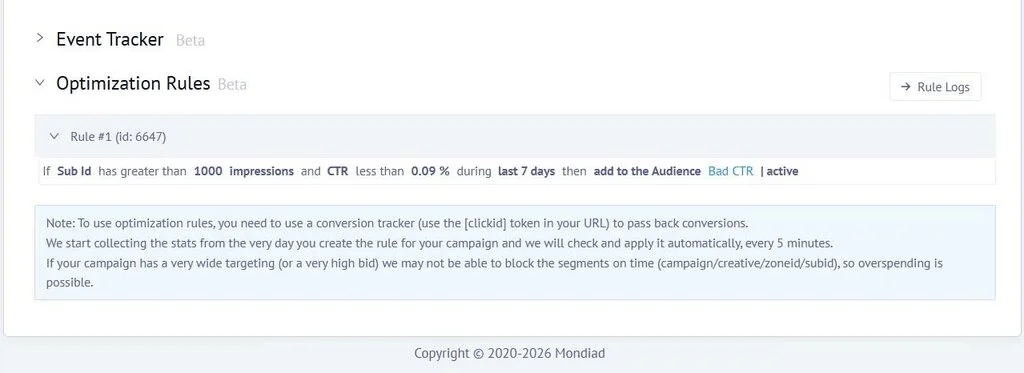
- Mondiad supports this type of advertiser through features such as real-time reporting, Smart Optimization Rules, TargetCPA bidding, zone-level custom bids, and full tracker integration.
The Self-Serve Advantage - and the Self-Serve Trap
Self-serve advertising is one of the most powerful shifts in performance marketing history. You set the targeting, the budget, the bidding logic, and the optimization rules. The platform executes. No agency layer, no account manager bottleneck, no waiting three days for a campaign change to be approved by someone else.
That control is the whole point. But control only creates value if you know what to do with it.
The majority of advertisers who sign up for a self-serve ad network - even experienced ones - use a fraction of the optimization infrastructure available to them. They set up a campaign, pick some targeting, choose a bid, and let it run. When it doesn't perform, they lower the bid or change the creative. When it does, they increase the budget. That's it.
This approach works, to a point. But it leaves the most powerful levers untouched - and in a competitive traffic environment, those untouched levers are exactly what your better-performing competitors are pulling.
This guide is for advertisers who want to use all of it.
Part 1: Campaign Architecture - Get This Right Before You Touch Anything Else
Every optimization decision downstream is constrained by how the campaign was structured at launch. A poorly architected campaign produces data you can't cleanly interpret, forces you to make decisions without statistical confidence, and makes it nearly impossible to isolate what's actually driving performance.
The foundational rule is this: never mix targets in a single campaign.
Split by GEO first
GEOs have different traffic characteristics, different competitive dynamics, different conversion rates, and different bid levels. Running the U.S. and Brazil in the same campaign means your average metrics obscure what's actually happening in each market - and your bid is either too high for one or too low for the other.
Launch separate campaigns per GEO. For Tier-1 markets (the U.S., the U.K., CA, AU, DE), expect higher CPMs and higher-intent audiences. For Tier-2 and Tier-3 markets, expect higher volume at lower cost but with more variance in quality. Segment them from the start, not after you've already blended the data.
Split by device type
Desktop and mobile users behave differently. Landing page performance differs by device. Conversion rates differ. Even the same ad creative can produce wildly different CTRs on desktop versus mobile. If you run mixed device campaigns, you'll never know which device is carrying the performance - and you can't bid differently for each one.
Create separate campaigns for desktop and mobile from day one. This single architectural decision will improve your ability to optimize by an order of magnitude.
Split by ad format
Each format reaches the user in a different context, at a different moment, with a different psychological frame. Push notifications reach users outside the browser environment with high interrupt value. Native ads meet users inside content with contextual relevance. In-page push reaches iOS users who would never receive classic push. Interstitials capture full-screen attention at content transitions.
Mixing formats in a single campaign averages out metrics that should never be averaged. Format-split campaigns give you clean data that tells you which format is producing results - and that's data you can act on.
The testing budget formula
For each test campaign, commit enough budget to accumulate statistically meaningful data before drawing conclusions. A useful starting point: set your daily budget to at least 3-5x your target CPA. If you're aiming for a $10 CPA, don't draw conclusions from a $15 daily spend - the sample is too small. Give the algorithm and the data room to tell you something real.
Part 2: Bidding Strategy - Match the Model to the Moment
The pricing model you choose is not just an accounting decision. It determines how the algorithm optimizes delivery, how much traffic you receive, and what kind of risk profile your campaign carries. Choosing the wrong model for your objective is one of the most common and most costly mistakes in self-serve advertising.
CPM: The volume and testing model
CPM (Cost Per Mille) charges you per thousand impressions, regardless of clicks or conversions. This makes it ideal for:
- Traffic exploration: When you're entering a new GEO or testing a new format, CPM gives you broad reach to gather data quickly.
- Brand awareness: When the goal is visibility rather than direct response, CPM aligns the cost model with the objective.
- Finding placements: Because CPM buys broadly, it surfaces which zones and publishers produce meaningful engagement - the raw material for whitelisting later.
The risk with CPM is that it can spend budget on non-converting placements without any automatic correction. That's where optimization rules and blacklists become critical (more on that in Part 3).
Starting point on Mondiad: Begin with the recommended bid for your GEO and device combination, which is visible during campaign setup. Don't start too low - insufficient bids won't win enough auctions to generate meaningful data. Don't start too high - you'll burn budget before you have the data to justify it.
CPC: The engagement model
CPC (Cost Per Click) charges only when someone clicks your ad, making it naturally efficient for campaigns where clicks are the primary KPI - affiliate offers, landing page traffic, lead generation.
The advantage of CPC is that non-engaging placements stop costing you money automatically. The risk is that clicks don't always predict conversions - a placement with high CTR may have low conversion rates if the audience intent doesn't match the offer.
When to switch from CPM to CPC: Once you've identified which zones produce CTR above your threshold via CPM testing, move high-performing zones to a CPC model. You're now paying only for the clicks that come from placements you've already validated.
TargetCPA: The outcome model
TargetCPA is the most sophisticated bidding mode available - and the one most advertisers underuse. Instead of buying traffic and hoping for conversions, you set a target cost per acquisition and let the algorithm optimize delivery to meet it.
How it works: the algorithm analyzes conversion data from your postback integration, identifies which placements and audience segments convert at or below your target CPA, automatically increases bids on high-performing sources and reduces them on poor ones, and adds non-converting placements to a blacklist automatically.
What you need to run TargetCPA well
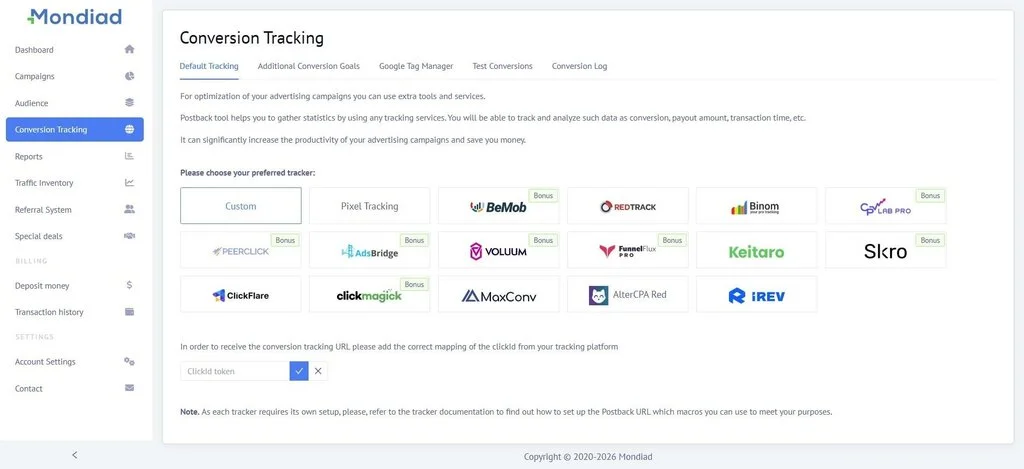
- A properly configured postback or S2S tracker integration (this is non-negotiable - the algorithm is blind without conversion data)
- Enough daily budget to generate conversion signals - typically $50/day minimum
- A realistic CPA target based on actual offer payouts (a $5 CPA target on a $3 payout offer will never converge)
- Patience during the learning phase - the algorithm needs 50-100 conversion events to start optimizing meaningfully
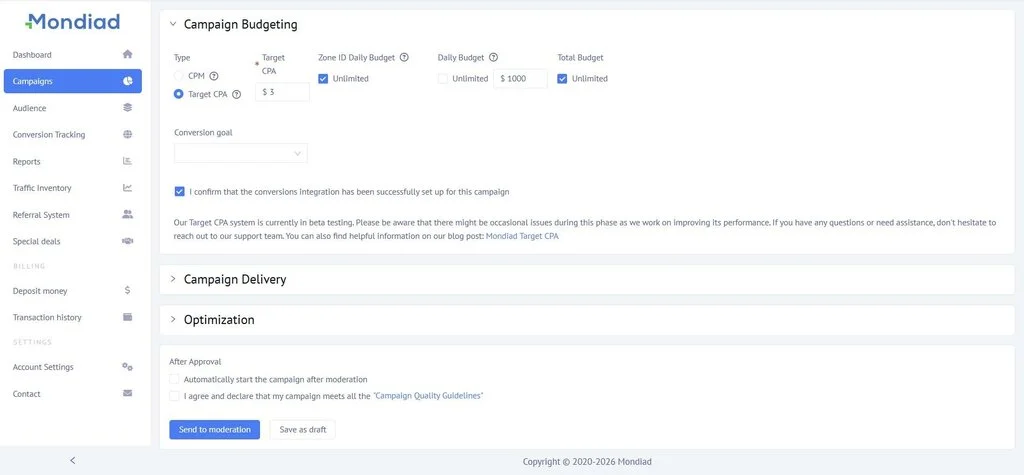
The payoff for doing this right is substantial. TargetCPA campaigns, once they've learned, can outperform manually optimized CPM campaigns by a significant margin - because the algorithm is making micro-adjustments at a speed and scale that no human can match.
On Mondiad: TargetCPA is available alongside CPM and CPC across all supported ad formats. The platform integrates natively with 10+ ad trackers like Voluum and Skro for conversion tracking - the data pipeline that makes TargetCPA work.
Part 3: Blacklists and Whitelists - The Most Underused Optimization Tool
If you're not actively managing blacklists and whitelists, you are paying for traffic you don't need to pay for. It's that direct.
Every ad network serves traffic across thousands of zones - individual publisher placements with their own audience profiles, traffic quality, and conversion behavior. Some of those zones will consistently underperform for your specific offer and vertical. Some will consistently overperform. The job of a sophisticated advertiser is to find both categories and act on them systematically.
Building your blacklist
A blacklist is a collection of zone IDs and/or sub-IDs that you exclude from your campaigns based on performance data. Here's the workflow:
Step 1 - Gather placement-level data. Run a broad CPM or CPC campaign for enough time (and spend) to accumulate statistically significant data at the zone level. The threshold depends on your CPA target - a useful rule is to blacklist any zone that has spent 3x your target CPA without producing a single conversion.
Step 2 - Don't just blacklist, first adjust bids. Before permanently excluding a zone, try reducing its bid to the minimum via custom bidding. Some zones that appear non-converting at a high CPM can become profitable at a lower entry price. Blacklisting is permanent; bid reduction is reversible. Give the zone another chance at a lower cost before closing the door entirely.
Step 3 - Export and reuse. Once you've built a blacklist on one campaign, apply it as a starting point to new campaigns in the same vertical and GEO. You're not starting blind - you're starting with intelligence already built in from prior spend.
Step 4 - Maintain it. Traffic sources change over time. A zone that was clean six months ago may have degraded. A zone that was poor may have improved. Review blacklists quarterly and run occasional re-tests on excluded sources before permanently keeping them out.
Building your whitelist
A whitelist is the inverse: a list of zones that have proven to convert for your offer. Running a whitelist campaign means your budget flows only to pre-validated placements - it's the highest-efficiency campaign mode available.
The whitelist workflow
Step 1 - Identify winners from broad campaigns. Collect zone IDs where your CPA is at or below target, and where you've had sufficient conversion volume to trust the signal (typically 5+ conversions from a single zone).