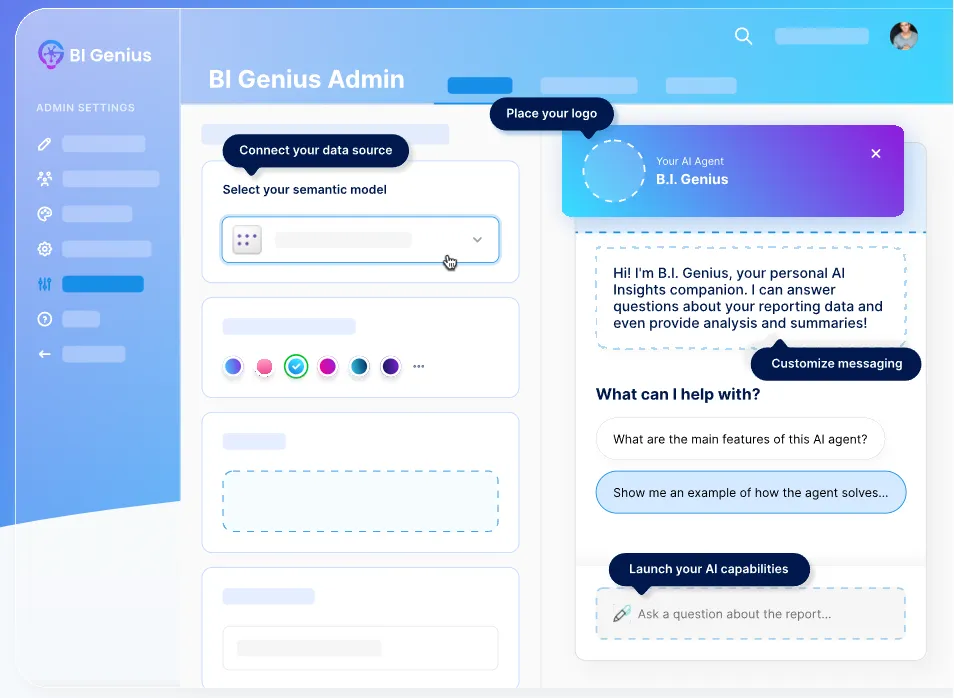
AI agents in analytics act as intelligent assistants that understand business questions and translate them into governed data insights. Beginning with a Power BI semantic model ensures that the agent works with trusted relationships, measures, and business logic rather than raw datasets. This leads to faster self-serve insights, consistent metric answers across dashboards, as well as safer data access aligned with enterprise governance. This guide is built for BI developers, data analysts, along with product teams exploring scalable AI-powered analytics.
What an AI Agent Should Do on Top of a Semantic Model
A Power BI dashboard usually presents the final insights, but an AI agent works behind the scenes to make them conversational and dynamic. Its role is to interpret a question, map it to the semantic model, run the right query, as well as clearly explain the results while aligning with existing business definitions. When filters or context are missing, the agent should ask clarifying questions and operate within guardrails such as role-level permissions as well as governed data access.
Core Agent Capabilities
Strong agents start with intent detection and metric mapping, so questions always connect to predefined measures instead of raw fields. Filter inference along with query generation aids translate natural language into accurate DAX logic while keeping responses aligned with semantic relationships. Outputs should include explanations, follow-up suggestions, as well as citations of measures, usually formatted as tables, summaries, or structured insights similar to a Power BI dashboard.
Step-by-Step: Build an AI Agent for a Power BI Semantic Model
Define the Agent Purpose and Scope
Start by deciding what the AI agent should do, such as answering KPI questions, explaining dashboards, or generating insights. Recognize the semantic model, allowed datasets, as well as user roles to ensure the agent operates within clear boundaries.
Prepare and Structure the Semantic Model
Optimize the Power BI semantic model using a star schema, predefined DAX measures, consistent naming conventions, as well as detailed field descriptions. If you need a refresher on building these data foundations, completing a foundationalpower bi free course is an excellent way to master model structuring. Add synonyms and a business glossary so the agent understands natural language queries accurately.
Design the Agent Logic and Prompts
Create clear instructions that explain how the agent should interpret questions, map metrics, apply filters, as well as generate queries. Include guardrails that prevent guessing, enforce governance rules, and require clarification when information is missing.
Connect the Agent to the Semantic Model
Integrate the agent with the Power BI dataset using supported query methods or APIs so it can access governed data safely. Ensure role-level security and permissions are respected during every interaction.
Test, Validate, and Iterate
Test the agent using real business scenarios to confirm accurate metric mapping, filter handling, as well as clear explanations. Monitor feedback, refine prompts, update synonyms, and continuously improve performance.
Create Your BI Agent with BI Genius: Plug-and-play AI agent creation platform.
BI Genius is built as a configurable AI engine that connects directly to Power BI semantic models, SQL databases, APIs, as well as external data sources. Instead of building generic chatbots, organizations make purpose-built AI analysts aligned with their own KPIs, workflows, and reporting standards. This plug-and-play approach accelerates time-to-value by allowing administrators to adjust AI logic without complex engineering work.
The platform focus explainability and governance, giving teams visibility into DAX statements, semantic relationships, as well as decision paths behind every answer. With source attribution as well as audit tracking, BI Genius aids organizations scale AI while maintaining transparency along with compliance. Its Power BI-native architecture ensures agents remain consistent, secure, and aligned with enterprise analytics practices.
How BI Genius Stands Out
Fully customizable AI agents tailored to specific semantic models as well as business definitions
Explainable AI with semantic traceability, DAX visibility, as well as decision path analysis
Plug-and-play deployment that reduces development time from weeks to hours
Enterprise governance with tenant control, dataset restrictions, and user-level security
Best Practices to Make the Agent Accurate and Trusted
Use predefined DAX measures instead of raw columns to maintain consistent logic and governance
Apply clear naming conventions and field descriptions within the semantic model
Always display applied filters and timeframes to maintain transparency
Add synonyms and glossary terms to improve natural language understanding
Configure explainability rules so users can see how answers were generated
Monitoring, Governance, and Iteration
AI agents improve over time as teams monitor interactions, refine prompts, and strengthen the semantic model structure. Governance plays a critical role, especially when multiple dashboards or tenants rely on AI-generated insights. B
Logging and Audit Trails
Logging should store prompts, generated outputs, as well as underlying queries to maintain full visibility into AI interactions. Tracking failures aids in identifying gaps in synonyms, measures, or model relationships that may affect accuracy. Audit trails also support compliance requirements by reflecting how each answer was produced.
Performance and Cost Control
Performance optimization includes caching frequently used queries, applying rate limits, as well as refining query generation rules. Efficient semantic model design lowers unnecessary computation as well as aids maintain predictable capacity usage. Governance tools within BI Genius help administrators monitor usage patterns and control costs at scale.
Continuous Improvement Cycle
Teams should review incorrect answers weekly to refine measures, update synonyms, as well as improve documentation clarity. Adjusting prompts and governance rules making sure the agent evolves alongside changing business definitions. This ongoing iteration transforms AI agents into reliable analytics partners rather than experimental tools.
Common Mistakes When Building Agents for Semantic Models
Weak semantic model structure leads to inconsistent or inaccurate answers
Missing glossary or synonym layers cause metric mismatches
Creating AI agents for Power BI semantic models starts with a clean, well-governed data foundation that defines metrics clearly as well as enforces strong security. Once governance and semantic structure are in place, organizations can configure agent logic, apply explainability rules, as well as consistently refine performance through testing loops. A practical starting point is to made one KPI-focused agent first, validate trust and adoption, and then expand into broader AI-powered analytics experiences.
Disclaimer: This post was provided by a guest contributor. Coherent Market Insights does not endorse any products or services mentioned unless explicitly stated.
Share this story
R
About Author
Ravina
Ravina is a content writer and market research enthusiast specializing in emerging technologies, artificial intelligence, and industry trends. With a focus on intelligent document processing, AI-powered optical character recognition (AI OCR), and enterprise automation, Ravina explores how technological advancements are transforming business operations and data management. Through research-driven articles, Ravina aims to simplify complex market developments, highlight key industry trends, and provide valuable insights into evolving technologies and their impact on businesses worldwide.
Interested in industry outlook for Internet Security Market?Request Free Sample